Subsistence Internet
Skip the details — take me to the bottom line ↓
A storm took my power out for thirty-one hours. The interesting part was over in fourteen minutes.
That is how long the UPS lasted — one UPS, carrying everything. When it quit, all of it went at once: the cluster, the switching, the access points, the gateway.
Fourteen minutes was a great deal less than I had expected, and being that wrong about a number I thought I knew is what sent me looking. I had thirty-one hours to look.
What a Car Battery Taught Me
Somewhere in the dark I wired up a car battery and an inverter.
The first thing that turned up was that both ISPs were still up. Whatever the storm had done, it had not touched their side of the demarc. The Internet had been there the whole time, sitting a few feet from equipment with nothing to run it.
So I fed the modems and my Internet gateway off the improvised supply and brought the path back. The gateway carries a small PoE budget of its own, and that was enough to light one access point — so the WiFi came back too, off a car battery, out of a single box.
And my battery-powered WiFi devices still could not get online.
That sentence is the reason this post exists. I had restored the Internet — carriers, modems, gateway, the entire path — and the devices that wanted it were sitting there with hours of charge in them, and nothing worked.
Without meaning to, I had built the obvious fix and watched it fail. A car battery and an inverter are a crude second power source for the Internet gear, which is exactly the upgrade I would otherwise have bought, installed, and felt clever about. On its own it does nothing.
The Dependency With No Fallback
What I had actually found was that nothing in the home could turn a name into an address.
My DNS servers do two jobs at once. They are authoritative for the internal view of my domain — I run split-horizon DNS, so they answer with internal addresses unknown to public DNS servers. They are also the recursive resolvers for every name outside my domain.
That combination is not a mistake. It is what split-horizon costs. A client is configured with a list of DNS resolvers and uses them for all queries; there is no way to tell a phone to ask one resolver about my domain and a different one about everything else. Choose split-horizon and you have chosen one set of servers that must answer every question every device asks.
Which also means there is no fallback, by construction. I cannot hand clients a public resolver as a backup, because a public resolver does not know my names — it would answer the public questions and break the private ones.
None of that is the error. The error was failing to follow it through, in two directions I had never looked.
I had never noticed that my Internet connectivity depended on my cluster. The ISPs, the gateway, the WiFi — those are the things you would list if someone asked what your Internet depends on, and that night all three of them were working. A device with a perfect path to the Internet and nothing to resolve names with is simply offline, and no amount of health in the rest of the chain rescues it.
And I had never compared the relative power costs. Keeping the Internet and the WiFi alive is a matter of tens of watts — a gateway and an access point, exactly as the car battery demonstrated. Keeping my DNS answers alive meant keeping a three-node Proxmox cluster alive, with its ECC memory and its mirrored storage, which is a different order of magnitude altogether. In terms of power used, I had made the cheapest part of my network depend on the most expensive part, and I had never once put those two numbers beside each other.
The three resolvers were real redundancy, and all of the same kind: three containers on one cluster, which is to say three copies of one dependency in one power domain. Spreading copies across nodes protects you from losing a node. It does nothing about anything all the nodes share.
A gateway on its own UPS gives you a working path to the Internet and no way to use it — path intact, unusable. So follow the chain past the obvious links: whatever your clients cannot function without has to move to the surviving tier too, and for most networks that list starts with name resolution. Then price what you found. A cheap dependency chained to an expensive one inherits the expensive one’s runtime, and that is where the surprise usually hides.
Two Networks, and Only One of Them Matters at 2 a.m.
The car battery had drawn the line for me without my noticing. What I had chosen to power off it at two in the morning was not a random subset of my equipment — it was a category, and everything I had left dark was the other one. Sketching it out afterward, the gear sorted itself so cleanly that I felt slow for not having seen it before:
The subsistence network — the minimum required to stay connected. The ISP handoffs, the gateway, one small PoE switch, a couple of access points, and a resolver.
The luxury network — everything else. The cluster and its guests, the fast access points, the big switches, file service, cameras, the DVR.
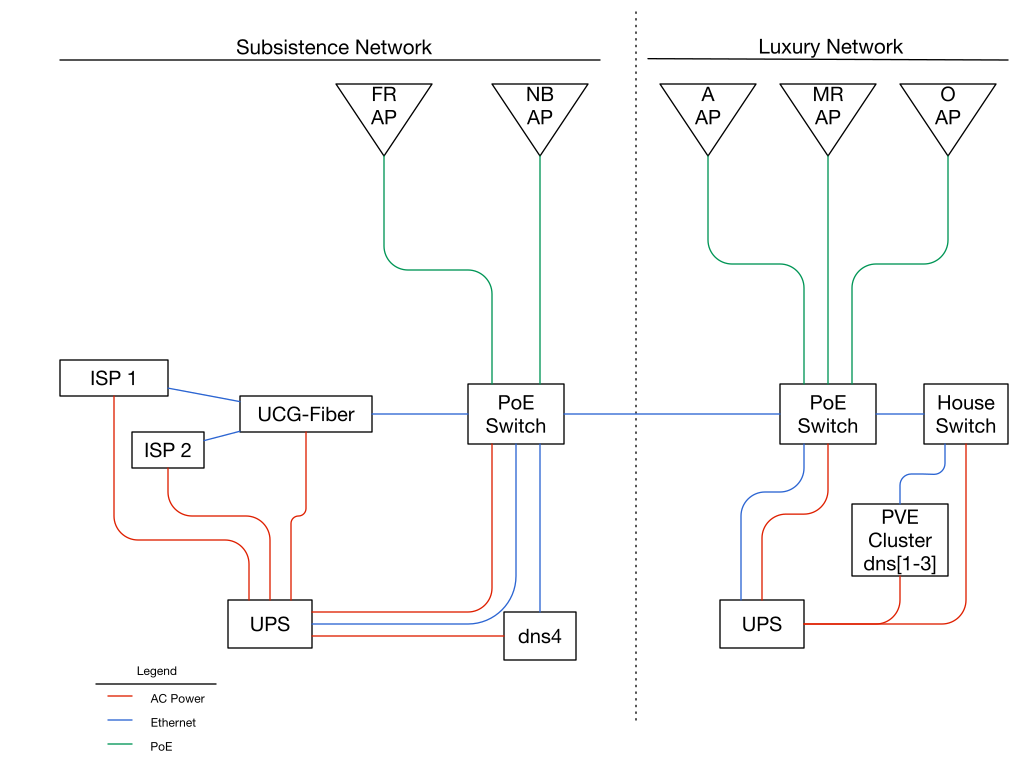
The layout after the rebuild. The dotted line is the one that matters: everything left of it has to survive on its own, so the AC power, the Ethernet and the PoE all stop at that line too. Only the blue Ethernet link crosses it — and when the luxury side goes dark, losing that link costs the subsistence side nothing.
The network names are the useful part. Once you have them, the placement question asks itself: during an outage, is this thing subsistence or luxury? DNS resolution is obviously subsistence. It had been sitting in the luxury tier for years.
Separating the Networks Meant Separating the UPSes
Before the storm there were no tiers, just outlets. One UPS carried the whole load — cluster, switching, access points, gateway, all of it sharing a single battery and therefore a single runtime, set by the heaviest thing plugged into it.
That is the part that could not be fixed by rearranging anything. As long as the subsistence gear draws from the same battery as the cluster, it inherits the cluster’s runtime, and the cluster is where the watts are. Sorting the network into two roles only becomes real when the two roles stop sharing a battery.
So the split had to be physical: a second UPS, carrying nothing but the subsistence network. A permanent, better-behaved version of the car battery on the floor — but wired to a new resolver as well as to the gateway, which is the part the car battery taught me it needed.
Pulling a little load off the luxury UPS buys the luxury network slightly longer runtime, which is a nice fringe benefit. The important benefit is the other direction: the subsistence network, alone on its own battery with a small load, now runs for hours instead of minutes.
Power and Network Paths Have to Agree
This is the point I would keep if I could keep only one.
A UPS gives a device power. It does not give it a path. The subsistence tier is not a set of devices — it is a set of devices plus every hop between them, and all of it has to be on the right side of the line.
Three kinds of wire had to be checked, and they are easy to check separately and get wrong together:
- AC power. The obvious one, and the only one most people trace.
- Ethernet. A device on the subsistence UPS whose uplink switch is on the luxury UPS is a luxury device wearing a disguise. It keeps running and stops being reachable.
- PoE. The one that hides, because the power and the network arrive on the same cable from the same box. An access point is only as protected as the switch port feeding it — which means an AP is on whichever tier its switch is on, no matter which room it lives in.
That last one nearly caught me. Splitting access points across tiers is not a matter of choosing which APs matter; it is a matter of which switch each one plugs into, and that switch’s power decides for you.
The diagram above is really just this rule drawn out: red, blue and green all stop at the dotted line together. The one crossing is a single Ethernet link between the two switches, and it is deliberately the only thing that dies at the boundary.
Follow AC, Ethernet and PoE separately, hop by hop, and assume nothing about where a wire goes because of where it ought to go. I found one link that would have made the whole rebuild theatre — the subsistence switch appeared to chain through the luxury spine, which would have left the survivors running perfectly and talking to nobody. It turned out not to, but I learned that by tracing cable, not by remembering.
The Subsistence Tier Is a Watt Budget
That comparison I had never made — the relative power cost of each half of the network — is not a footnote to the design. It is the design.
The subsistence tier is not “the important gear.” It is “the gear that fits in the watt budget.” Every watt on that tier is minutes off the runtime, so the question stops being what do I want during an outage and becomes what can I afford to keep powered. Those are very different questions, and the second one has much shorter answers.
My access points make it concrete. They are the same brand, a generation apart:
| Older APs | Newer APs | |
|---|---|---|
| Model | U6 Lite | U7 Pro XG |
| Max power | 12 W | 22 W |
| Power method | plain PoE | PoE+ |
| Uplink | 1 GbE | 10 GbE |
The newer ones are better and earn their place on mains power. They are also nearly twice the draw, they demand more from the switch, and they run hot enough that you notice when you touch one. Fine habits. Expensive ones on battery.
So the older pair are the subsistence APs. They cover the home at twelve watts apiece, and the fast hot ones are allowed to go dark. On the subsistence tier, good enough everywhere beats excellent nearby.
The same contrast, and more starkly, in the two boxes each network hangs off:
| Subsistence gateway | Luxury switch | |
|---|---|---|
| Model | UCG-Fiber | USW Pro XG 8 PoE |
| Max power | 29.4 W excluding PoE | 61 W excluding PoE, 210 W including |
| PoE budget | 30 W | 155 W |
The device that roots the entire subsistence network is rated below thirty watts. The single switch at the head of the luxury network is rated for two hundred and ten, before you count anything hanging off it. That gap, repeated in miniature across every device on each side of the line, is why the subsistence UPS now runs for hours where the old shared one ran for fourteen minutes. It is not a better battery. It is a much smaller ask.
Look at the PoE row, though, because that is the one that surprised me. Thirty watts is not much of a budget — and it is comfortably more than a twelve-watt access point needs. That is the whole reason the WiFi came back on the car battery: I powered one box, and one box quietly powered the access point behind it. The subsistence network was always small enough to fit inside its own gateway. I had just never had a reason to notice.
The Survivor
The fix is the box labeled dns4 in the diagram, and it is a Raspberry Pi.
Not another cluster node. A bare Pi running BIND, doing both of the jobs above: a caching recursive resolver and an authoritative secondary of the internal zones. It has to be both, for the same reason the originals are: split-horizon leaves the client no way to split the question, so a survivor that answers only half of them strands it just as completely. Full root recursion, no forwarder, nothing upstream with an opinion about my queries. The zone copies persist to disk with a 28-day expiry, so it keeps answering authoritatively for about four weeks after the primary disappears. That is longer than any outage I intend to have.
Three choices in there were deliberate:
- Same software as the others. BIND, with the same configuration idioms, because a survivor you administer differently is a survivor you will misconfigure.
- Bare metal, not a container. The entire point is to not be on the cluster.
- Not highly available. Making the survivor HA would put it straight back onto the tier I am trying to escape.
It is also stripped down to almost nothing — no desktop, no print service, no mDNS, no RPC — until the only things listening are DNS and SSH. A survivor should be small. Every service it runs is one more way for it to not be there when you need it.
And a spare nobody is told about is not a spare
There was a second, dumber problem, and on its own it would have quietly defeated everything above.
DHCP was handing out exactly one resolver. So even if one of the three had somehow survived, no client would have thought to ask it. My name service was one deep on the wire no matter how many copies were running.
DHCP now hands out all four, with the Pi last. Clients prefer the cluster and fall through to the survivor only when the cluster is gone. The cost is a few resolver timeouts during a total outage, which is exactly the right trade.
What Else Was Riding on the Wrong Tier
Two more things turned out to be the same mistake wearing different hats, and finding them is what convinced me the tier idea was worth the rewiring.
Nothing was ever told to shut down. The UPS knew perfectly well that it was on battery and running out.
No server knew, because nothing was wired to tell them.
The nodes were not shut down at fourteen minutes; they were cut off.
That is a worse outcome than a clean shutdown and it was free to fix.
The shutdown notification now runs on dns4, on the subsistence tier — because a process that warns machines about a power failure is worthless if it is on the power that failed.
The monitoring was a guest of the thing it monitors. Checkmk runs in a container on the cluster, so at fourteen minutes I lost the monitoring at the same moment I lost the thing worth monitoring, and had to reconstruct the outage timeline afterward from a log that simply stopped.
That one I did not move, and the reasoning is worth stating because it cuts against the tidy version of this post. Checkmk is heavy. Putting it on the subsistence tier would spend watts — and therefore runtime — on something that is not required to keep the home connected. So it stays a luxury service, and it stays a guest of what it monitors. What moved instead is the small, urgent job: the shutdown notification, which has to survive, and now does.
The job that must survive an outage is small — notice the power failed, tell the machines to stop. The job that helps you understand it afterward is large. Put the small one on the tier that lives and let the large one die with everything else. Trying to keep your whole observability stack alive on battery is how the watt budget gets spent on the wrong thing.
Three Questions Worth Asking About Your Own Setup
- Which UPS feeds which machine, and which switch feeds which UPS? I could not answer either when the power came back. Answering them took two evenings with a flashlight and changed the design twice. Until that map exists, no post-mortem you write can say what should have stayed up.
- Does anything your clients cannot function without live only on the tier that dies first? Name resolution, certainly — especially if a split-horizon setup means there is no public fallback. Then think about what else: a password manager that syncs, a door lock controller, the thing that tells you the power is out.
- Are clients actually told about the survivor? A survivor nobody queries is decoration.
The batteries will still run out. That was never the part worth fixing. What changed is the order things go dark in, and how long the home can keep answering its own questions on the way down.
← Topics In Timekeeping Is Live Sub-Nanosecond at Home, with GNSS and AI →